

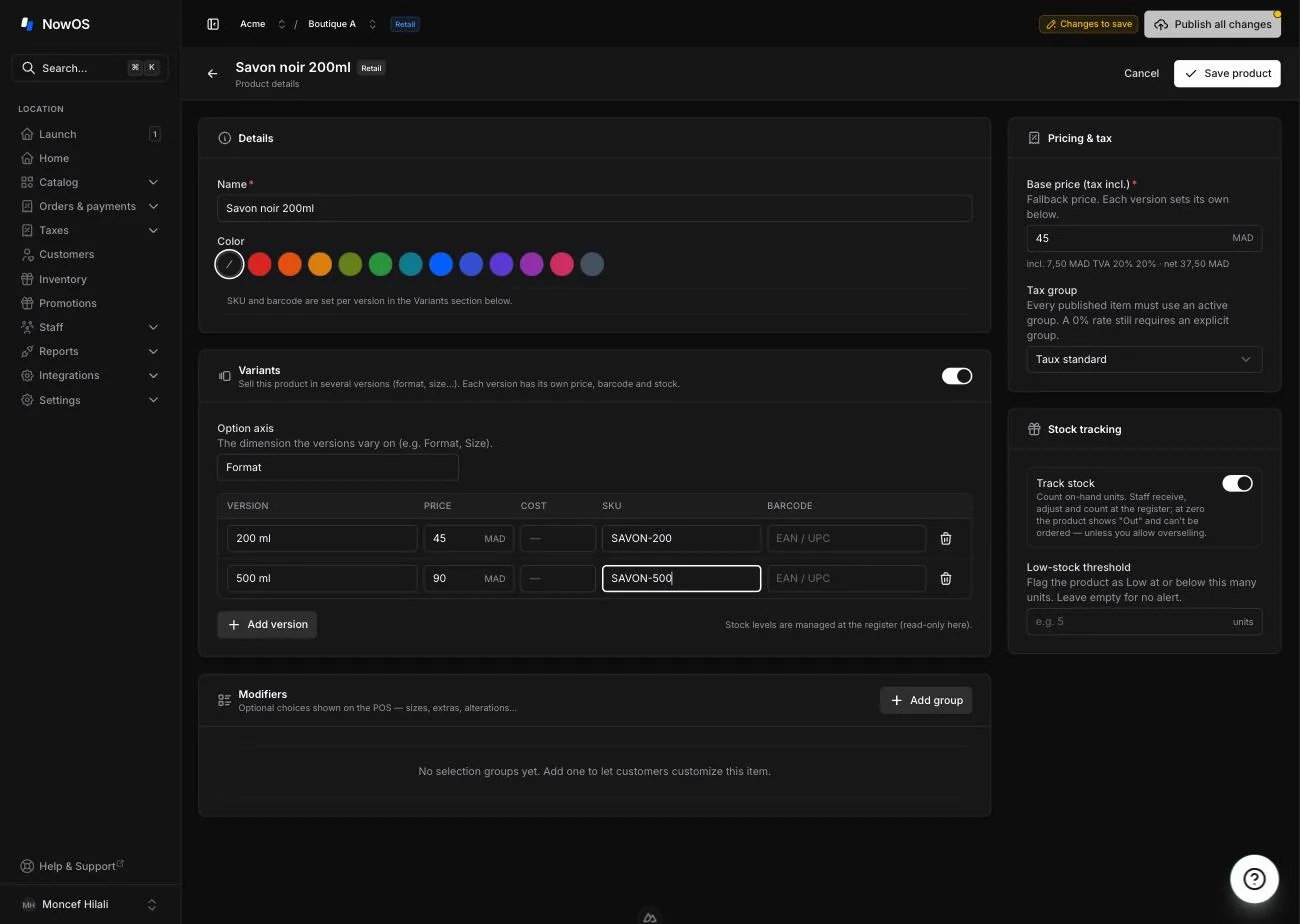
Create variants
- Open a product in Item library.
- Turn on Variants.
- Name the version axis (for example “Format” or “Size”).
- Add a version with Add version, then fill in for each one: the label (e.g. “1 kg”), the price, the SKU, the barcode and, optionally, the cost.
- Publish the catalogue.
Variant stock is managed at the register (receive, adjust, count) — see
Inventory. The backoffice shows it read-only;
each version appears as “Product · Version”.
At the register
- When a product has versions, tapping its tile opens a picker: choose the version (its price and stock are shown), add any options, then confirm. The total = version price + options.
- Scanning a version’s barcode adds it directly, no picker.
- Two different versions stay separate lines: a “250 g” never merges with a “1 kg”.
- To manage a version (adjust or recount its stock, mark it unavailable), long-press the product tile: the Stock by version sheet opens — see managing stock at the register.
Good to know
- Sold-out (86) can target a specific version: you can mark the magnum sold out while keeping the 75 cl available.
- Variants and options stack: a version plus a paid add-on (for example an alteration on a garment).
- A product without variants behaves exactly as before.