

Combos are configured in Catalog → Combos (Catalog → Bundles in
retail mode).
How the price is split
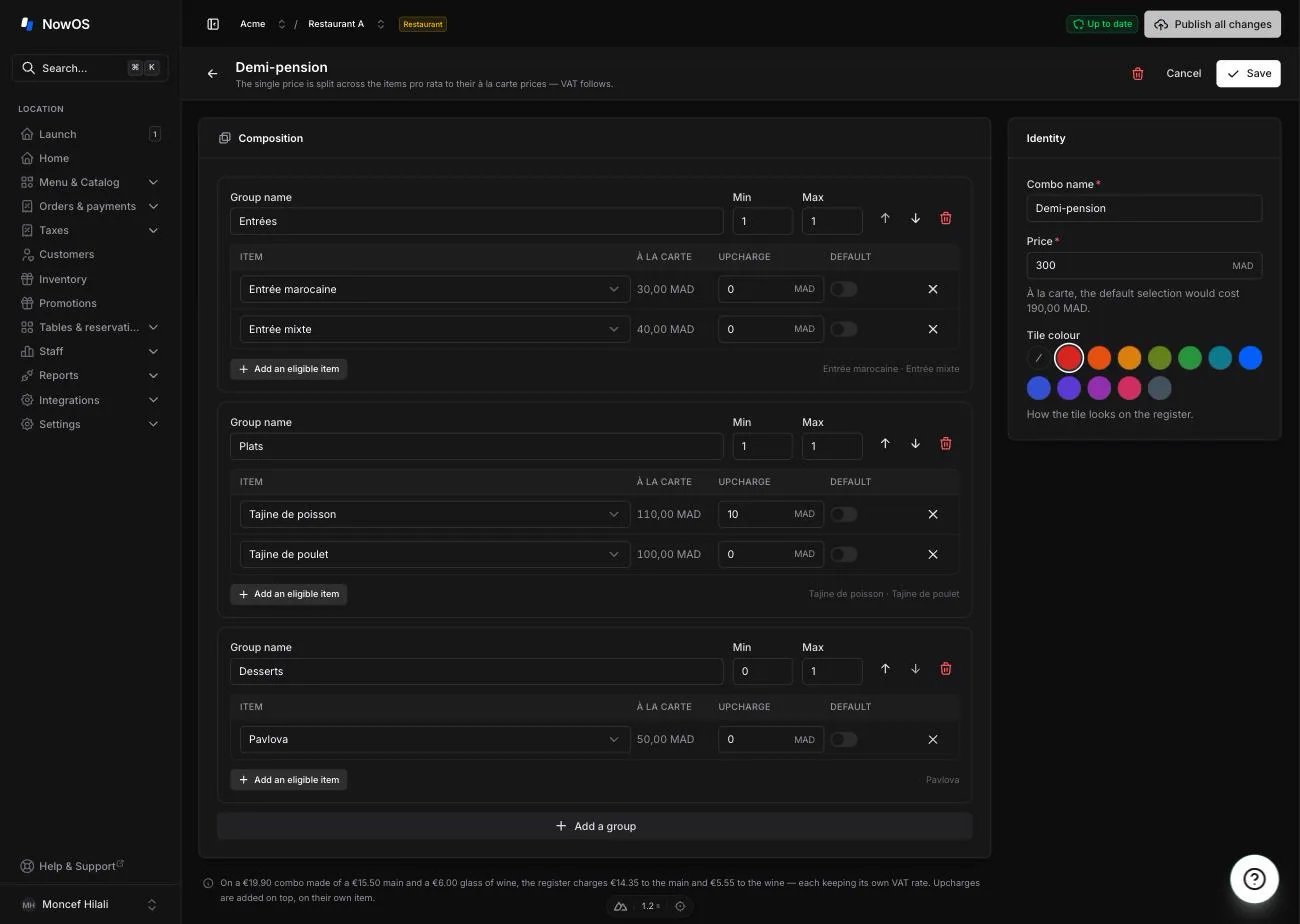
You advertise one price. The register then splits it across the combo’s items, pro rata to their à la carte prices. On a €19.90 combo made of a €15.50 main and a €6.00 glass of wine, the register charges €14.35 to the main and €5.55 to the wine. Each keeps its own VAT rate — which is exactly what the French tax authority requires when a combo contains alcohol.An upcharge never changes the combo’s own price: it is added on top, on
its own item, and taxed at that item’s rate.
Create a combo
1
Open Catalog → Combos
Click New combo (New bundle in retail).
2
Name it and set its price
The name is what your guests see on the receipt. Under the price field, the
page shows what the default selection would cost à la carte — so you can
see at a glance what the combo gives away.
3
Add your groups
A group is one choice to make: “Starter”, “Main”, “Dessert”. Min and
Max say how many items the guest takes from that group — 1 and 1 for a
single choice.
4
Add the eligible items
In each group, add the items on offer. For each one:
- Upcharge: what the guest pays extra for picking this one (the cod at +€2.00). Leave 0 when there is no upcharge.
- Default: the item is preselected when the register opens the combo.
5
Save, then publish
Like every catalog change, the combo only reaches the registers on the next
publish — see menu and items.
An item sold in versions (a size, a format) must be named by its version in
the combo: “Coffee · 1 kg”, never just “Coffee”. The picker only offers
versions, never the parent item — see versions.
Put it on the register
A combo is placed on a register screen like an item. In Catalog → Menus & screens, open the screen you want, pick the Combos tab in the right-hand panel, then click the combo to place it. See register layout.What staff see
On the register, the tile opens a screen where staff pick one item per group. The price at the bottom recaps the combo, any upcharges, and the total. Once added, the combo appears on the check as one block: its name, its price, and the items listed underneath. See taking an order.Things to know
- A combo goes to the kitchen item by item. Each item joins its own prep station and its own course: the starter fires with the starters, the dessert with the desserts. The kitchen ticket names the combo the item belongs to.
- A combo is voided whole. Removing one item from a combo removes the whole combo — there is no half combo.
- A sold-out item can block the combo. If a required group has no available item left, the tile greys out and the register says so. Make an item available again, or sell the items à la carte.
- Reports give you both readings. Each item counts at its real share of the price, and Reports → Product mix adds a table of combos sold with their share of revenue.
Bundles in retail
In retail mode a bundle works the same way, with two differences:- there is nothing to choose, so scanning or tapping the bundle adds it straight to the cart, with no intermediate screen;
- it carries its own barcode and SKU, so it scans at the register like any other product.
To sell several versions of a gift box — one with Bordeaux, one with Burgundy
— create one bundle per version, each with its own barcode. That is what
the shelf already does.